How it works
How getmitch works
You take the photo. Mitch writes the post. Here is what happens after you submit a finished job from your phone, and which plan does what.
The route from van to published
Down tools
Job done, area swept, customer happy. Mitch only starts once the work is finished.
Send it in
Before you pull away, open the app, add a couple of photos and a line on what you did. Speak it if typing with dusty hands is a pain. Add the customer's mobile if you want a review text later.
Mitch drafts the lot
Roughly sixty seconds on, the best photo is chosen, before and after shots are paired, and each post names the job and the town you did it in.
Read it, tap approve
The drafts wait. Change a line, ask for a rewrite, or bin one. Approved posts drop into your calendar. On Local and Complete, the review text follows a day or two after the job.
Inside each step
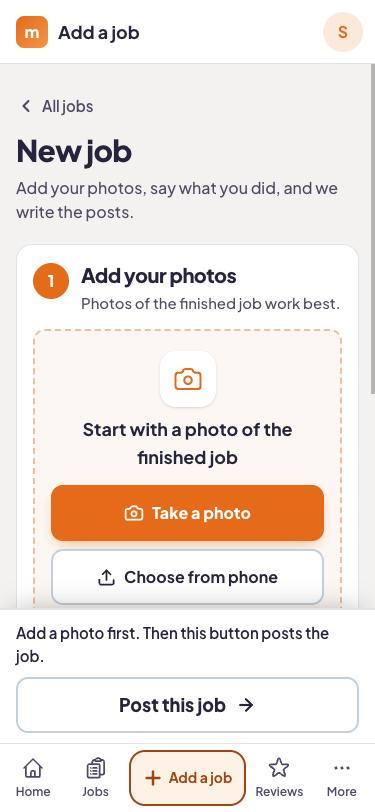
A two-minute job in the app
Pick photos from the camera roll, write or dictate a sentence, done. Each lad on the crew has the branded app on their own phone, so the person who did the work can be the one to send it in, not the boss at ten at night.
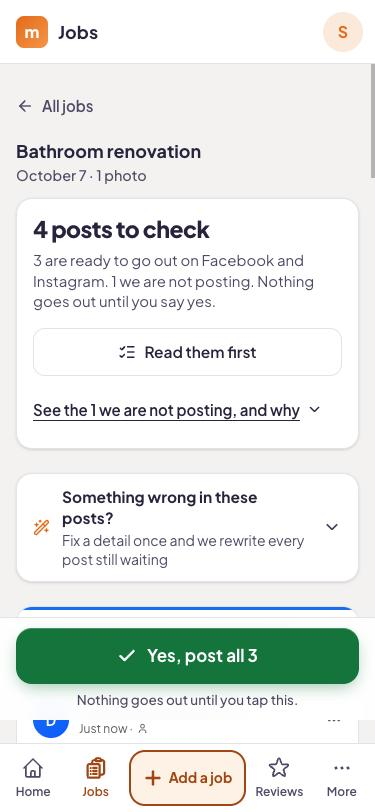
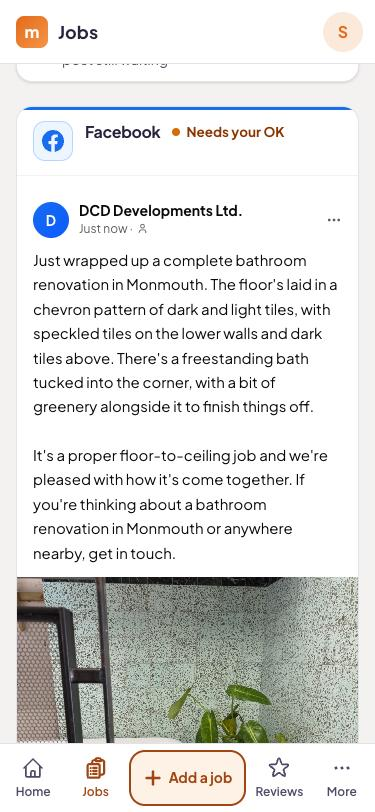
Drafts built from your note and your photos
Mitch works from what you told it, not a template. A before and after pair gets used as a pair. The wording carries the job type and the town, so it sounds like a local firm, not a brochure.
The calendar is where you stay in charge
Everything queued sits in one calendar view. Skip a Tuesday post, move another to Saturday morning, or tweak the wording over a brew.
Review replies drafted for you (Local and Complete)
A new Google review arrives and a reply is already written. Edit it if you like, then approve.
Comments and messages in one place (Local and Complete)
A "what would this cost for my place?" comment under a post lands in the same inbox as your Facebook and Instagram messages, so it does not get lost.
One job, followed through
In this made-up example, Priya Shah's firm, Shah & Sons Heating, runs three vans out of Stockport. On a Thursday afternoon her engineer Tom swaps an old regular boiler for a combi in a semi in Heaton Moor, with a new magnetic filter and a system flush. He sits in the van, drops in three photos, and says: "Combi swap, magnetic filter, flushed, customer had hot water again by four."
About a minute later, on Social he has a Facebook post and an Instagram post that mention Heaton Moor and the swap. On Local there is a Google Business Profile post as well. Priya looks them over that evening and approves two. The review text goes to the customer a day or two after Tom sent the job in.
Checkatrade, Rated People and Trustpilot each run their own review systems. Mitch's text sends people to Google, so that is the profile that gets built up.
What the plans do with the same job
Sending a job in works identically whichever plan you are on. The difference is how far Mitch takes it.
- Social, £79 a month: Facebook and Instagram posts, stories and reels, a content calendar, the branded crew app, 3 seats.
- Local, £149 a month: all of Social, then Google Business Profile posts, a review request text 24 to 72 hours after the job, AI-drafted replies to every review, an inbox for comments and messages, 5 seats.
- Complete, £349 a month: all of Local, then on-page SEO fixes, the WordPress plugin, a new blog page every week, local rank tracking, 10 seats.
Plan: Before a review text can be sent
You need the customer's mobile number and the consent tick, both added when the job is submitted. Without them nothing is queued. Texting customers falls under UK privacy and marketing rules (UK GDPR and PECR). This is general information, not legal advice.
Send in your next job
14 days free and no card. Put a real job through and read what comes back.
Questions answered
Do I have to submit every job?
What if I forget to submit a job on the day?
Does it post the moment I submit?
Can I change what Mitch writes?
Try it on your next job.
Start the trial, take a photo when you finish tomorrow's job, and see what Mitch does with it.