Google Business Profile
Google Business Profile management for contractors
Each job you submit becomes a Google Business Profile post with your best photo and the town you did it in. People who find you on Maps see last week's work, not a profile frozen in 2021.
Most contractors set up a Google Business Profile once and leave it. The newest photo is from the year they started. The posts tab is empty. The reviews have no replies.
Then someone's water heater gives out, they search "plumber near me", and Google shows three businesses on a map. They tap into each one. The one with recent work and answered reviews looks open for business. The other two look like a coin toss.
Why the profile never gets touched
"I know I should post on there." You do, and you will, after the busy season. Meanwhile each job you finish is the kind of thing a profile is supposed to show, and none of it makes it onto Google because it is one more place to log in and type.
There is also the question of what to say. A post that reads "Quality service you can trust" tells nobody anything. A post that says you replaced a 50-gallon water heater in a tight crawl space in a named town is a post a local searcher reads.
How Mitch handles it
A post from every job
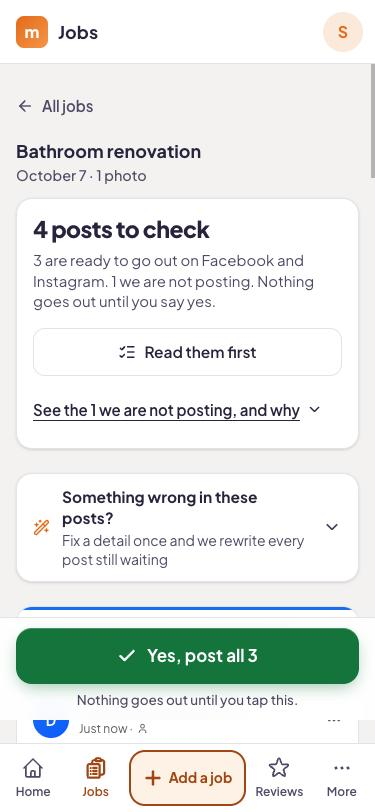
Mitch picks the strongest photo from the job you submitted and writes a short post about what you did and where.
Same submission as your social posts
You do not log into Google. The post comes from the one job submission that also produces your Facebook and Instagram posts. Everything lands on your content calendar.
Replies to your reviews
Mitch drafts a reply to every review on your profile, good or bad, so none sit unanswered for months. You read each one and approve it.
Your profile, in practice
The posts are only one part of a healthy profile. Your categories, hours, service areas and photos matter too, and those are yours to set. Mitch keeps the activity side going so the profile does not look abandoned. If you want to work through the rest yourself, the Google Business Profile blog covers it step by step.
Plan: On the Local and Complete plans
Google Business Profile posts and AI-drafted review replies are included from Local ($189 a month). Complete is $449 a month. Social ($99 a month) covers Facebook and Instagram only. Every plan has a 14-day free trial with no card.
- Job board + photo submission from your phone
- Posts to Facebook and Instagram (posts, stories, reels)
- Content calendar
- Custom branded app for the crew
- 3 user seats
- Everything in Social
- Google Business Profile management and posts
- Automatic review requests after every job
- AI-drafted replies to every review
- Comments and messages inbox for your socials
- 5 user seats
- Everything in Local
- On-page website SEO fixes
- WordPress plugin
- A new blog page every week
- Local rank tracking
- 10 user seats
Every plan starts with 14 days free, no card needed. Month to month, cancel any time.
A worked example
Say you run a small plumbing company in Fort Worth. Your tech Luis replaces a leaking 40-gallon water heater in an Arlington garage. He photographs the finished install and the new drain pan, then sends the job in with a voice note: "Water heater swap, new expansion tank, haul away."
About a minute later there are three drafts: Facebook, Instagram and Google Business Profile. The Google one is built from the install photo and the note, and names the town. You read it, change "swap" to "replacement" if you prefer, and approve it. It sits on your content calendar for the day you choose.
When a review comes in later, Mitch drafts a reply that you read and approve the same way.
Where this fits
A fresh post and a replied-to review make a profile look active, and an active profile is easier for a customer to trust. If you also want your reviews to keep coming, pair this with review requests. If your Facebook page is quiet too, that is social media.
Put this week's job on your Google profile
Start the 14-day free trial, send in a finished job, and see the Google post Mitch writes. No card needed.
Questions answered
How often does Mitch post to Google?
Does it write about my real work?
Does Mitch set up or fix my profile?
Do I approve review replies?
Can I just post on Google myself?
Does this replace Yelp, Angi or Nextdoor?
Which plans include it?
Try it on your next job.
Start the trial, take a photo when you finish tomorrow's job, and see what Mitch does with it.