Social media
Social media management for tradies
The photos are already on your phone. Send in a finished job and Mitch writes the Facebook and Instagram post, story and reel, then puts them on a calendar for you to approve.
Before someone rings a tradie they've never used, there's a fair chance they look at the Facebook page. They aren't judging design. They're checking whether you're busy and still trading. Photos from this month answer that. A page whose last post is from the footy finals doesn't.
So why is it quiet? You're booked three weeks out, and the Sunday night you set aside for posting got swallowed by quotes.
The two bad options
Do it yourself and you need captions, hashtags and the discipline to keep going. You're a carpenter, not a content creator. Hire someone and you may get stock images and a caption that fits any trade in any suburb. What works is specific: this deck, this roof, this suburb.
How Mitch handles it
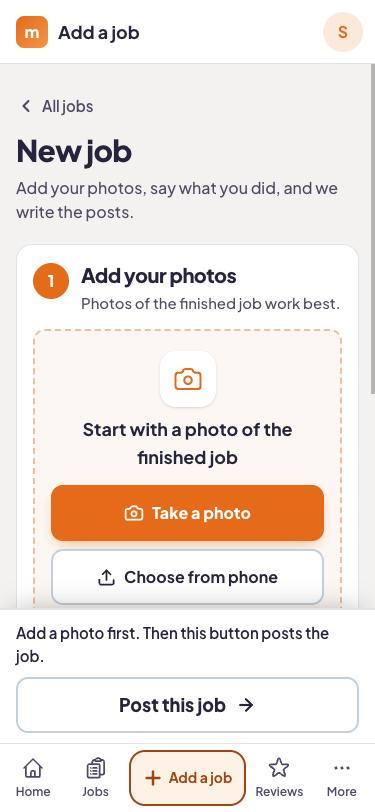
Send the job in from your phone
One or two photos, a line about the work, the customer's number if you want a review text later. Anyone on the crew can do it in the app, and the note can be dictated.
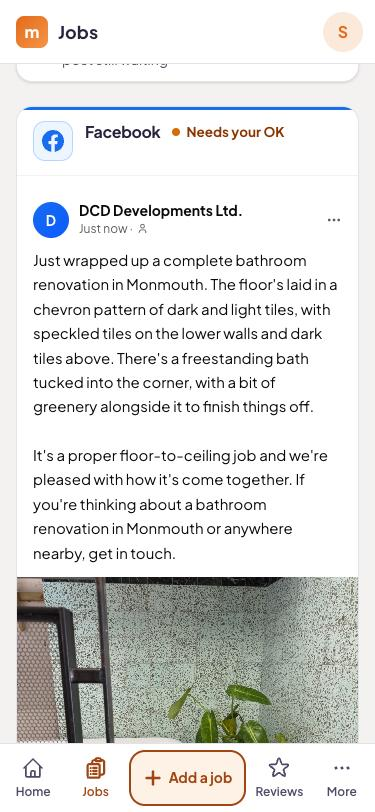
Mitch writes the posts
About a minute later: Facebook and Instagram posts, stories and reels about the real job, named after the suburb.
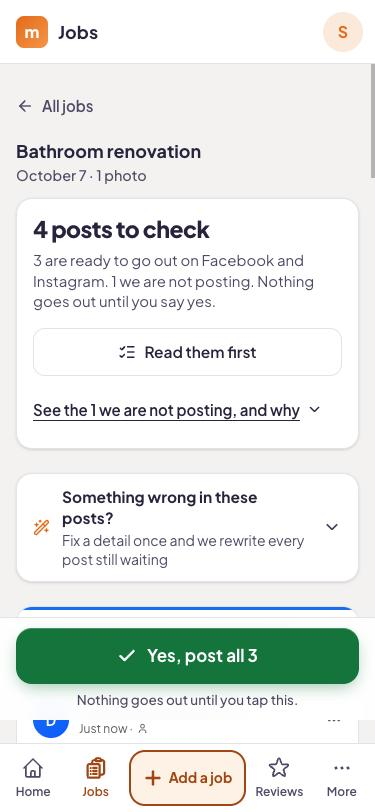
You decide what goes out
Read it, change a line, or have Mitch try again, then approve. Approved posts sit on the content calendar so you can see what's going out and when.
Beyond the Facebook page
Social is in every plan. On Local and Complete the same job also feeds your Google Business Profile and queues a review text, and comments and messages from your socials come into one inbox. See Google Business Profile and review requests.
Plan: Every plan has it
Facebook and Instagram posts, stories and reels, the content calendar and the crew app start with Social at A$129 a month, with 3 seats. Local is A$249, Complete A$579. 14 days free, no card.
- Job board + photo submission from your phone
- Posts to Facebook and Instagram (posts, stories, reels)
- Content calendar
- Custom branded app for the crew
- 3 user seats
- Everything in Social
- Google Business Profile management and posts
- Automatic review requests after every job
- AI-drafted replies to every review
- Comments and messages inbox for your socials
- 5 user seats
- Everything in Local
- On-page website SEO fixes
- WordPress plugin
- A new blog page every week
- Local rank tracking
- 10 user seats
Every plan starts with 14 days free, no card needed. Month to month, cancel any time.
Example job
Here is a made-up example. Brad is a carpenter in Newcastle with two blokes on the tools. He finishes a spotted gum deck in Merewether, snaps it on Friday arvo and sends it from the ute: "Old deck out, spotted gum in, stainless balustrade, five days."
Soon there's a Facebook post, an Instagram post and a story waiting, naming Merewether and the timber. Brad adjusts a line about the crew, approves the lot and sets Facebook for Saturday morning, when the footy-watching locals are scrolling.
What it won't do
Without a job sent in, there's nothing to write about, which is the point. It doesn't run ads and it can't promise reach or likes. What it does is keep the page current with real work and take the writing off your plate. For tactics, see the social media blog.
Wake the page up
Send in one finished job on the 14-day free trial and see the posts Mitch writes. No card.
Questions answered
How often does it post?
Will anything go live without me?
My photos are average.
Do I have to write up the job?
Can the crew use it?
Does it replace a social media manager?
Which plans?
Try it on your next job.
Start the trial, take a photo when you finish tomorrow's job, and see what Mitch does with it.